Felix Krause
Co-Founder of contextsdk.com
Founder of fastlane.tools

While I leverage AI for my work, all my blog posts are handcrafted.
spaceship - now also supporting iTunes Connect

It’s been about 6 weeks since the initial version of spaceship was released. As you may know, spaceship is the tool that’s powering almost all of the other fastlane tools to interact with Apple’s web-services.
Just 10 days ago I silently rolled out the initial version of spaceship for iTunes Connect to use it in the new tools you all have been using already: pilot and boarding.
I finished implementing all remaining API endpoints and writing the documentation to finally release this:
Introducing the first version of spaceship for iTunes Connect
Finally you can interact with all important API endpoints the iTunes Connect service has to offer without using the iTunes Connect front-end. All API calls are really fast as spaceshipcommunicates with the WebObject based back-end directly.
Here are some examples taken from the official documentation:
# Fetch all available applications
all_apps = Spaceship::Tunes::Application.all

# Find a specific app based on the bundle identifier or Apple ID
app = Spaceship::Tunes::Application.find("com.krausefx.app")
# or
app = Spaceship::Tunes::Application.find(794902327)

# Access information about the app
app.apple_id        # => 1013943394
app.name            # => "Spaceship App"
app.bundle_id       # => "com.krausefx.app"

# Show the names of all your apps
Spaceship::Tunes::Application.all.collect do |app|
  app.name
end

# Create a new app
app = Spaceship::Tunes::Application.create!(name: "App Name",
                                primary_language: "English",
                                         version: "1.0",
                                             sku: 123,
                                       bundle_id: "com.krausefx.app")

# Submitting an app for review
submission = app.create_submission

# Set app submission information
submission.content_rights_contains_third_party_content = true
submission.content_rights_has_rights = true
submission.add_id_info_uses_idfa = false

# Finalize app submission
submission.complete!
For more examples check out the official documentation on GitHub.
What can you do with spaceship for iTunes Connect?
- Manage your applications, update their metadata and even submit apps for review
- Manage your app’s builds and get information like the testing status, number of installs, expiry date and even submit builds for TestFlight beta review
- Manage all your beta testers (check out pilot and boarding as an example project using it)
What could you build with spaceship for iTunes Connect?
- Automatically sync iTunes Connect users with your company internal user system
- Automatic daily backups of all iTunes Connect and Apple Dev Portal data
- Automatically send customers emails once a new version of their app got approved
- Build a lightweight dashboard for your clients to see a grid of their apps with the current download numbers, reviews and app review status
- Add App Review Notifications (e.g. Waiting for Review) to your company dashboard or push them directly to Slack
Letting computers do the hard work

As iOS developers we’re still used to doing many manual tasks. It’s an issue that exists because everything is still new. Just ask your back-end developer about the last time they manually deployed a new version directly to the production server. The answer should be: Oh, I was still in high school back then. Why? Because there are many mechanisms before the actual release to avoid broken releases that don’t pass the tests.
Using fastlane you can already automate a large part of your daily development tasks, but one thing was missing:
Have you ever been to an airport, where you had to ask the manager of the airport if you can board now? Once the manager agrees, you’ll be carried from your check-in to your gate into your plane.
Because that’s what you are doing right now as an app developer when you want to invite a beta tester to your TestFlight app. And you even repeat that for every single beta tester you invite.
Right now, you have to go through 9 steps (on the right) just to invite one beta tester to your TestFlight program.
Have you ever asked a blog publisher if they add you to their newsletter? No, that’s not how that works!
I just launched boarding, a tool that allows you to launch your own TestFlight Invite page in under 3 minutes.
More information about this project can be found on GitHub.
About Automation
If you’re reading this post, chances are high you are an iOS/Mac developer. You get paid for developing iOS applications which is probably what you’re best in.
Are you responsible for…?
- Creating and uploading screenshots
- Updating app metadata like the description
- Manually building and uploading a beta build when your boss tells you to
- Inviting new beta testers to your beta testing service
You probably said yes to some of those points. In my experience most developers do those things manually. Why?
We haven’t got time to automate this stuff, because we’re too busy dealing with the problems caused by our lack of automation. - @bitfield
While some developer may enjoy doing passive activities, you usually want to get your job done. That means working on the iOS/Mac app itself working on awesome new features.
That’s why we have to follow our friends from the back-end team and start automating tedious processes. Instead of us, computer should do those tasks.
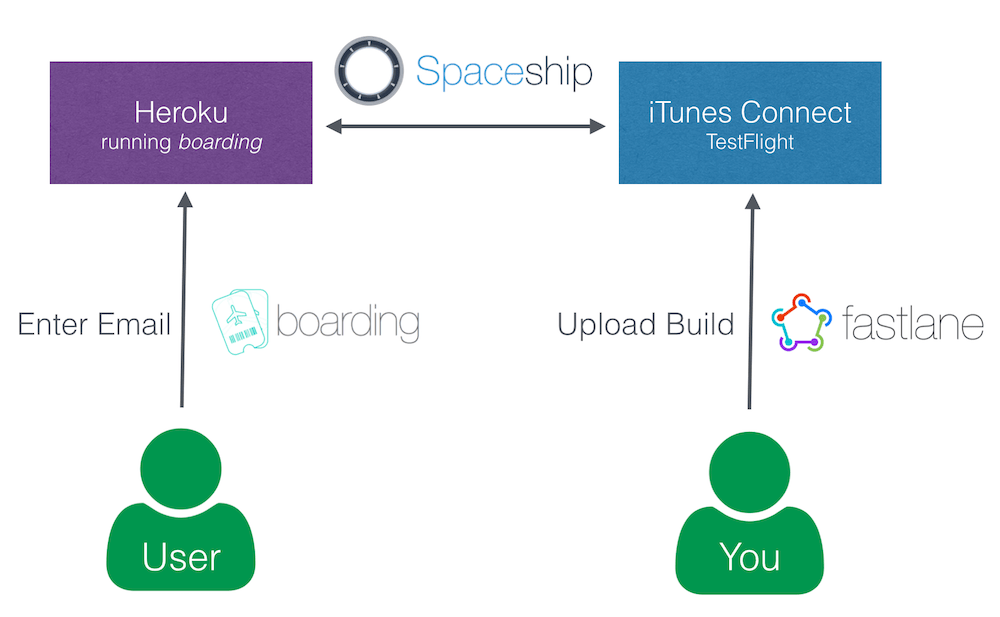
As you can see, the users interested in beta testing your application accesses your Heroku application directly to enter their email address. The Heroku app will then use spaceship to communicate with iTunes Connect directly without any interaction from a real person. Spaceship automatically registers the new testers, adds them to the application and sends out the TestFlight email.
You as an developer are in no way involved in this process. Once you merge into your beta branch, fastlane will go ahead and build, sign and upload your app, resulting in automatic emails to all your testers. (this depends on how you use fastlane)
If you tried the Heroku button, you’ll see there are no additional manual steps required to get a web service running. You enter your credentials, choose your application and the web service is up and running.
What’s next?
The primary use case of boarding was not to actually solve this certain problem, but to demonstrate what’s possible using spaceship. In only 24 hours I had the idea for boarding, started working on it and released it publicly.
Think about what you can build with spaceship. It’s a foundational tool to communicate with Apple’s web services, both the Apple Developer Portal and iTunes Connect allowing you to build all kinds of cool things!
Some random ideas:
- Automatically sync iTunes Connect users with your company internal user system
- Automatic daily backups of all iTunes Connect and Apple Dev Portal data
- Automatically send customers emails once a new version of their app got approved
- Build a lightweight dashboard for your clients to see a grid of their apps with the current download numbers, reviews and app review status
- Using the same change-log text for all languages? Why should you copy&paste the text manually to 10 languages?
- Added App Review information to your company dashboard or push them directly to Slack
Tags: testflight, automation, spaceship, boarding
pilot - Manage your TestFlight builds and testers

Using pilot, you can now manage your TestFlight builds and testers using the command line.
- Upload new builds and distribute them to all testers
- List all available builds
- Add and remove beta testers
- Get information about testers, like the registered devices
- Export and import all your testers
Open on GitHub
boarding - The easiest way to invite your TestFlight beta testers

Have you ever been to an airport, where you had to ask the manager of the airport if you can board now? Once the manager agrees, you’ll be carried from your check-in to your gate into your plane.
Because that’s what you do right now as an app developer when you want to add a new tester to your TestFlight app
Why don’t you have a simple web site you can share with potential testers (e.g. email newsletter, Facebook, Twitter) on which people interested in trying out your new app can just board on their own?
Open on GitHub
Tags: testflight, spaceship